다음은 데이터 파일 입니다.
|
export const ZODIAC1 = "쥐,소,호랑이,토끼,용,뱀,말,양,원숭이,닭,개,돼지".split(",");
export const ZODIAC2 = "자,축,인,묘,진,사,오,미,신,유,술,해".split(",");
export const ZODIAC3 = "子,丑,寅,卯,辰,巳,午,未,申,酉,戌,亥".split(",");
export const HOURS = "23시~01시,01시~03시,03시~05시,05시~07시,07시~-09시,09시~11시,11시~13시,13시~15시,15시~17시,17시~19시,19시~21시,21시~23시".split(",")
export const LIVERS1 = "갑,을,병,정,무,기,경,신,임,계".split(",");
export const LIVERS2 = "甲,乙,丙,丁,戊,己,庚,辛,壬,癸".split(",");
export const FIVE_COLORS1 = "청,청,적,적,황,황,백,백,흑,흑".split(",");
export const FIVE_COLORS2 = "靑,靑,赤,赤,黃,黃,白,白,黑,黑".split(",");
export const FIVE_COLORS3 = "푸른,푸른,붉은,붉은,황금,황금,한얀,하얀,검은,검은".split(",");
export const FIVE_ELEMENTS1 = "목,목,화,화,토,토,금,금,수,수,".split(",")
export const FIVE_ELEMENTS2 = "木,木,火,火,土,土,金,金,水,水".split(",")
export const LONGEVITY = "해,산,물,돌,구름(또는 달),소나무,불로초,거북이,학,사슴(또는 대나무)".split(",");
export const NAMES = "한놈,두시기,석삼,너구리,오징어,육계장,칠면조,팔다리,구두쇠,쨍그랑".split(",");
|
Zodiac.css 파일을 만듭니다.
|
li {
float: left; margin-right: 15px; width: 120px;
}
ul {
clear: both;
}
|
Zodiac.js 파일을 만듭니다.
|
import * as data from './Data/data'
import './Zodiac.css'
// 10간(十干) :天干(천간)
export const HeavenlyStems = () => {
let outer_divStyle = {
width : "1100px",
paddingTop : "5px",
paddingBottom : "5px",
margin : "5px"
}
let inner_divStyle = {
width : "100px",
textAlign : "center",
padding: "2px",
border : "1px solid gray",
margin:"2px",
backgroundColor:"#f8fde7",
float : "left"
}
return (
<div style={outer_divStyle}>
<h2>10간(十干) :天干(천간)</h2>
{
data.LIVERS1.map((steam, index)=> <div style={inner_divStyle} key={index}>{steam}({data.LIVERS2[index]})</div>)
}
<br style={{clear:"both"}}/>
</div>
);
}
// 12지(十二支) : 地支(지지)
export const ZodiacSigns = () => {
let outer_divStyle = {
width : "1320px",
paddingTop : "5px",
paddingBottom : "5px",
border : "0px solid gray",
margin : "5px"
}
let inner_divStyle = {
width : "100px",
textAlign : "center",
padding: "2px",
border : "1px solid gray",
margin:"2px",
backgroundColor:"#f8fde7",
float : "left"
}
return (
<div style={outer_divStyle}>
<h2>12지(十二支) : 地支(지지)</h2>
{
data.ZODIAC1.map((zodiac, index)=> <div style={inner_divStyle} key={index}>{zodiac}({data.ZODIAC3[index]}, {data.ZODIAC2[index]})</div>)
}
<br style={{clear:"both"}}/>
{
data.HOURS.map((hour, index)=><div style={inner_divStyle} key={index}>{hour}</div>)
}
<br style={{clear:"both"}}/>
</div>
);
}
// 육십간지(六十干支)
export const SexagenaryCycle = ()=>{
let outer_divStyle = {
width : "1100px",
paddingTop : "5px",
paddingBottom : "5px",
margin : "5px"
}
let inner_divStyle = {
width : "100px",
textAlign : "center",
padding: "2px",
border : "1px solid gray",
margin:"2px",
backgroundColor:"#f8fde7",
float : "left"
}
let cycle = [];
for(let i=0;i<60;i++){
cycle.push(<div style={inner_divStyle} key={i}>{data.LIVERS1[i%10]}{data.ZODIAC2[i%12]}({data.LIVERS2[i%10]}{data.ZODIAC3[i%12]})</div>)
}
return (
<div style={outer_divStyle}>
<h2>육십간지(六十干支)</h2>
<div>
환갑(還甲)은 세는 나이로 61살, 만 나이로 60세 생일을 축하하는 한국의 전통 문화로, 회갑(回甲)이라고도 한다.
간지는 60년마다 같은 이름을 가진 해가 돌아오므로, 회갑은 육십갑자가 다시 돌아왔다는 의미이다.
</div>
<br/>
<div>
{cycle}
</div>
<br style={{clear:"both"}}/>
</div>
);
}
// 년도별 세차(歲次)와 색상 그리고 띠
export const YearCycle = ()=>{
let outer_divStyle = {
width : "1100px",
paddingTop : "5px",
paddingBottom : "5px",
margin : "5px"
}
let inner_divStyle = {
width : "200px",
textAlign : "center",
padding: "2px",
border : "1px solid gray",
margin:"2px",
backgroundColor:"#f8fde7",
float : "left"
}
let years = [];
let year = new Date().getFullYear();
for(let i=year-70;i<year+20;i++){
years.push(
<div style={inner_divStyle} key={i}>
{i}년 <br/>
{data.LIVERS1[(i-4)%10]}{data.ZODIAC2[(i-4)%12]}({data.LIVERS2[(i-4)%10]}{data.ZODIAC3[(i-4)%12]})년
<br/>
{data.FIVE_COLORS3[(i-4)%10]} {data.ZODIAC1[(i-4)%12]}
({data.FIVE_COLORS2[(i-4)%10]}{data.ZODIAC3[(i-4)%12]}, {data.FIVE_COLORS1[(i-4)%10]}{data.ZODIAC2[(i-4)%12]} )
</div>)
}
return (
<div style={outer_divStyle}>
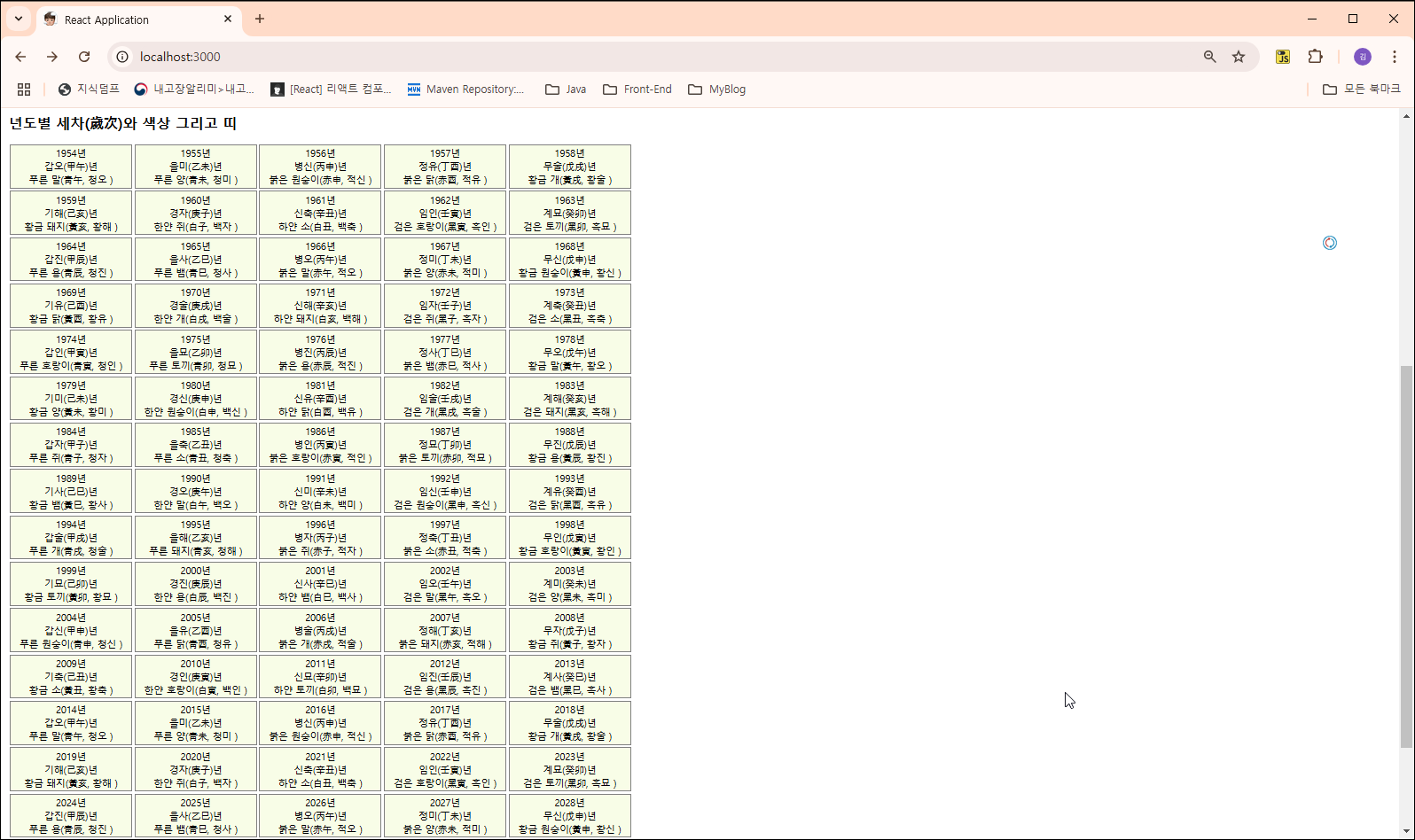
<h2>년도별 세차(歲次)와 색상 그리고 띠</h2>
<div>
{years}
</div>
<br style={{clear:"both"}}/>
</div>
);
}
|
App.js 파일을 만듭니다.
|
import * as Zodiac from './Zodiac'
const App = ()=>{
return (
<>
<Zodiac.HeavenlyStems/>
<Zodiac.ZodiacSigns/>
<Zodiac.SexagenaryCycle/>
<Zodiac.YearCycle />
</>
)
}
export default App;
|
index.js 파일을 만듭니다.
|
import React from 'react';
import ReactDOM from 'react-dom/client';
import App from './App';
const root = ReactDOM.createRoot(document.querySelector("#app"));
root.render(
<React.StrictMode>
<App/>
</React.StrictMode>
);
|
결과 화면 입니다.

'Front End > React' 카테고리의 다른 글
| [React Exam 36] 시계 만들어보기 (5) | 2024.11.04 |
|---|---|
| [React Exam 35] Counter 만들어보기 (1) | 2024.11.04 |
| [React Exam 33] map()을 이용한 3.1 혁명 민족 대표 보기 (3) | 2024.11.01 |
| [React Exam 32] map()을 이용한 지자체 홈페이지 나열하기 (1) | 2024.11.01 |
| [React Exam 31] map() 사용 시 key에 index를 사용하면 안되는 이유 (0) | 2024.10.31 |


